
How to Program in Arduino (Beginner’s Guide)
Arduino is one of the most popular platforms for learning electronics and programming. Whether you want to build DIY projects, automation systems, or smart devices, learning how to program in Arduino is the first and most important step. This guide will help you understand Arduino programming from scratch in a simple and practical way.
In this article, we’ll teach simple Arduino programming for beginners. We’ll connect a servo motor to an Arduino and learn how to move it left and right by uploading sweep code. This project is a perfect starting point for learning Arduino.
Arduino is widely used for –
- DIY electronics projects
- Robotics
- Home automation
- IoT (Internet of Things
- Learning embedded systems
Required
Before programming Arduino, you need a few basic things:
- Arduino – https://amzn.to/4ahcPQO
- Servo – https://amzn.to/4q9W4vN
- OTG – https://amzn.to/4biLxKW
- Printer Cable – https://amzn.to/49ZS76B
- Mobile or Laptop (your preference)
Software or App
You’ll need the Arduino ide software for your laptop. Or, if you’re using your mobile phone for programming, you’ll need to download the ArduinoDroid app.
Software – arduino ide or App – arduinodroid
Circuit Diagram
This is a simple circuit diagram of it –
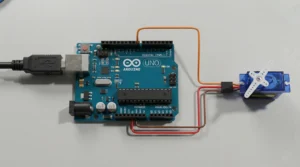
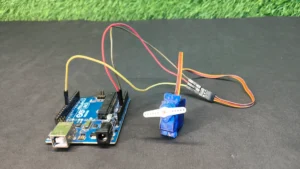
- Servo Red wire → Arduino 5V
- Servo Brown/Black wire → Arduino GND
- Servo Signal wire → Arduino Pin 9
Programming Code
Here is the programming code for Arduino 👇
#include <Servo.h>
Servo myservo;
void setup() {
myservo.attach(9); // Servo signal pin
}
void loop() {
for (int pos = 0; pos <= 180; pos++) {
myservo.write(pos);
delay(15);
}
for (int pos = 180; pos >= 0; pos–) {
myservo.write(pos);
delay(15);
}
}
Conclusion
In this tutorial, we learned simple Arduino programming for beginners, connecting a servo motor + Arduino and uploading the sweep code. This project is a perfect starting point for learning Arduino and robotics.

Electric shock
Check This Post https://dkcreativework.com/how-to-make-a-electric-man/
A really good blog and me back again.
wish you best and best